
Reactive Messaging
Overview
Reactive messaging offers a new way of processing messages that is different from the older method of using message-driven beans. One significant difference is that blocking is no longer the only way to apply backpressure to the message source.
Reactive messaging uses reactive streams as message channels so you can
construct very effective pipelines for working with the messages or, if you
prefer, you can continue to use older messaging methods. Like the message-driven
beans, MicroProfile Reactive Messaging uses CDI beans to
produce, consume or process messages over Reactive Streams. These messaging
beans are expected to be either ApplicationScoped or Dependent scoped.
Messages are managed by methods annotated by @Incoming and @Outgoing and the
invocation is always driven by message core - either at assembly time, or for
every message coming from the stream.
Maven Coordinates
To enable MicroProfile Reactive Messaging, add the following dependency to your
project’s pom.xml (see Managing
Dependencies).
<dependency>
  <groupId>io.helidon.microprofile.messaging</groupId>
  <artifactId>helidon-microprofile-messaging</artifactId>
</dependency>
To include health checks for Messaging add the following dependency:
<dependency>
  <groupId>io.helidon.microprofile.messaging</groupId>
  <artifactId>helidon-microprofile-messaging-health</artifactId>
</dependency>
Usage
Channels
Reactive messaging uses named channels to connect one source (upstream) with one consumer (downstream). Each channel needs to have both ends connected otherwise the container cannot successfully start.
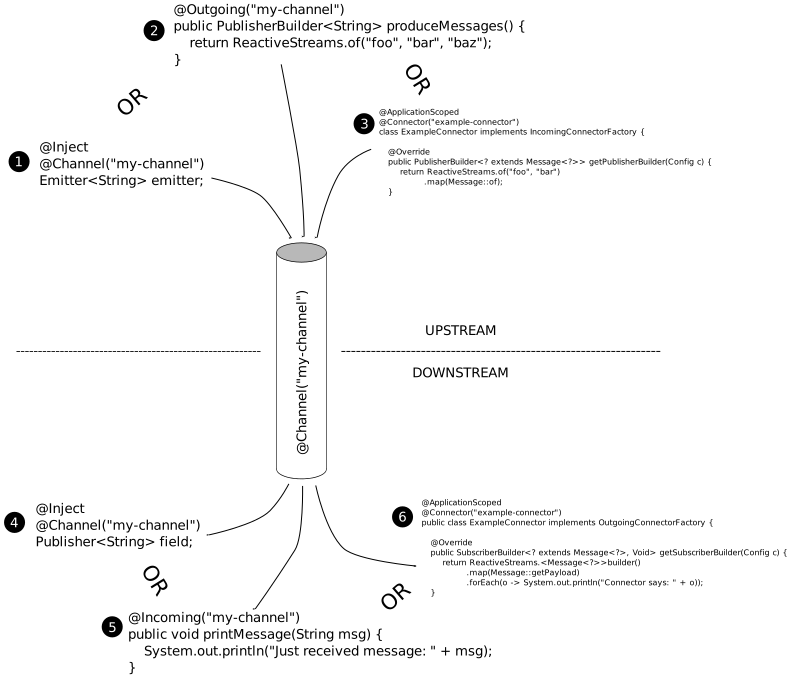
Channels can be connected either to emitter (1), producing method (2) or connector (3) on the upstream side. And injected publisher (4), consuming method (5) or connector (6) on the downstream.
Consuming Method
Consuming methods can be connected to the channel’s downstream to consume the
message coming through the channel. The incoming annotation has one required
attribute value that defines the channel name.
Consuming method can function in two ways:
- consume every message coming from the stream connected to the channels - invoked per each message
- prepare reactive stream’s subscriber and connect it to the channel - invoked only once during the channel construction
Example consuming every message from channel example-channel-2:
@Incoming("example-channel-2")
public void printMessage(String msg) {
    System.out.println("Just received message: " + msg);
}
Example preparing reactive stream subscriber for channel example-channel-1:
@Incoming("example-channel-2")
public Subscriber<String> printMessage() {
    return ReactiveStreams.<String>builder()
            .forEach(msg -> System.out.println("Just received message: " + msg))
            .build();
}
Injected Publisher
Directly injected publisher can be connected as a channel downstream, you can consume the data from the channel by subscribing to it.
Helidon can inject following types of publishers:
Publisher<PAYLOAD>- Reactive streams publisher with unwrapped payloadPublisher<Message<PAYLOAD>>- Reactive streams publisher with whole messagePublisherBuilder<PAYLOAD>- MP Reactive streams operators publisher builder with unwrapped payloadPublisherBuilder<Message<PAYLOAD>>- MP Reactive streams operators publisher builder with whole messageFlow.Publisher<PAYLOAD>- JDK’s flow publisher with unwrapped payloadFlow.Publisher<Message<PAYLOAD>>- JDK’s flow publisher with whole messageMulti<PAYLOAD>- Helidon flow reactive operators with unwrapped payloadMulti<Message<PAYLOAD>>- Helidon flow reactive operators with whole message
Example of consuming payloads from channel example-channel-1 with injected publisher:
@Inject
public MyBean(@Channel("example-channel-1") Multi<String> multiChannel) {
    multiChannel
            .map(String::toUpperCase)
            .forEach(s -> System.out.println("Received " + s));
}
Producing Method
The annotation has one required attribute value that defines the
channel name.
The annotated messaging method can function in two ways:
- produce exactly one message to the stream connected to the channel
- prepare reactive stream’s publisher and connect it to the channel
Example producing exactly one message to channel example-channel-1:
@Outgoing("example-channel-1")
public String produceMessage() {
    return "foo";
}
Example preparing reactive stream publisher publishing three messages to the channel example-channel-1:
@Outgoing("example-channel-1")
public Publisher<String> printMessage() {
    return ReactiveStreams.of("foo", "bar", "baz").buildRs();
}
Emitter
To send messages from imperative code, you can inject a special channel source called an emitter. Emitter can serve only as an upstream, source of the messages, for messaging channel.
Example of sending message from JAX-RS method to channel example-channel-1:
@Inject
@Channel("example-channel-1")
private Emitter<String> emitter;

@PUT
@Path("/sendMessage")
@Consumes(MediaType.TEXT_PLAIN)
public Response sendMessage(final String payload) {
    emitter.send(payload);
    return Response.ok().build();
}
Emitters, as a source of messages for reactive channels, need to address
possible backpressure from the downstream side of the channel. In case there is
not enough demand from the downstream, you can configure a buffer size strategy
using the @OnOverflow annotation. Additional overflow strategies are described
below.
Overflow strategies:
| Strategy | Description |
|---|---|
| BUFFER | Buffer unconsumed values until configured bufferSize is reached, when reached calling Emitter.emit throws IllegalStateException. Buffer size can be configured with @OnOverflow or with config key mp.messaging.emitter.default-buffer-size. Default value is 128. |
| UNBOUNDED_BUFFER | Buffer unconsumed values until application runs out of memory. |
| THROW_EXCEPTION | Calling Emitter.emit throws IllegalStateException if there is not enough items requested by downstream. |
| DROP | If there is not enough items requested by downstream, emitted message is silently dropped. |
| FAIL | If there is not enough items requested by downstream, emitting message causes error signal being send to downstream. Whole channel is terminated. No other messages can be sent. |
| LATEST | Keeps only the latest item. Any previous unconsumed message is silently dropped. |
| NONE | Messages are sent to downstream even if there is no demand. Backpressure is effectively ignored. |
Processing Method
Such methods acts as processors, consuming messages from one channel and producing to another.

Diagram shows how processing method (2) serves as a downstream to the
my-channel (1) and an upstream to the other-channel (3), connecting them
together.
Processing method can function in multiple ways:
- process every message
- prepare reactive stream’s processor and connect it between the channels
- on every message prepare new publisher(equivalent to
flatMapoperator)
Example processing every message from channel example-channel-1 to channel example-channel-2:
@Incoming("example-channel-1")
@Outgoing("example-channel-2")
public String processMessage(String msg) {
    return msg.toUpperCase();
}
Example preparing processor stream to be connected between channels example-channel-1 and example-channel-2:
@Incoming("example-channel-1")
@Outgoing("example-channel-2")
public Processor<String, String> processMessage() {
    return ReactiveStreams.<String>builder()
            .map(String::toUpperCase)
            .buildRs();
}
Example processing every message from channel example-channel-1 as stream to be flattened to channel example-channel-2:
@Incoming("example-channel-1")
@Outgoing("example-channel-2")
public Publisher<String> processMessage(String msg) {
    return ReactiveStreams.of(msg.toUpperCase(), msg.toLowerCase()).buildRs();
}
Connector
Messaging connector is an application-scoped bean that implements one or both of following interfaces:
IncomingConnectorFactory- connector can create an upstream publisher to produce messages to a channelOutgoingConnectorFactory- connector can create a downstream subscriber to consume messages from a channel
Example connector example-connector:
@ApplicationScoped
@Connector("example-connector")
public class ExampleConnector implements IncomingConnectorFactory, OutgoingConnectorFactory {

    @Override
    public PublisherBuilder<? extends Message<?>> getPublisherBuilder(Config config) {
        return ReactiveStreams.of("foo", "bar")
                .map(Message::of);
    }

    @Override
    public SubscriberBuilder<? extends Message<?>, Void> getSubscriberBuilder(Config config) {
        return ReactiveStreams.<Message<?>>builder()
                .map(Message::getPayload)
                .forEach(o -> System.out.println("Connector says: " + o));
    }
}
Message
The Reactive Messaging Message class can be used to wrap or unwrap
data items between methods and connectors. The message wrapping and unwrapping
can be performed explicitly by using
org.eclipse.microprofile.reactive.messaging.Message#of(T) or implicitly
through the messaging core.
Example of explicit and implicit wrapping and unwrapping:
@Outgoing("publisher-payload")
public PublisherBuilder<Integer> streamOfMessages() {
    return ReactiveStreams.of(0, 1, 2, 3, 4, 5, 6, 7, 8, 9);
}

@Incoming("publisher-payload")
@Outgoing("wrapped-message")
public Message<String> rewrapMessageManually(Message<Integer> message) {
    return Message.of(Integer.toString(message.getPayload()));
}

@Incoming("wrapped-message")
public void consumeImplicitlyUnwrappedMessage(String value) {
    System.out.println("Consuming message: " + value);
}
Acknowledgement
Messages carry a callback for reception acknowledgement (ack) and negative
acknowledgement (nack). An acknowledgement in messaging methods is possible
manually by org.eclipse.microprofile.reactive.messaging.Message#ack or
automatically according explicit or implicit acknowledgement strategy by the
messaging core. Explicit strategy configuration is possible with
@Acknowledgment annotation which has one required attribute value that
expects the strategy type from enum
org.eclipse.microprofile.reactive.messaging.Acknowledgment.Strategy. More
information about supported signatures and implicit automatic acknowledgement
can be found in specification Message acknowledgement.
| Acknowledgment | Description |
|---|---|
@Acknowledgment(Acknowledgment.Strategy.NONE) | No acknowledgment |
@Acknowledgment(Acknowledgment.Strategy.MANUAL) | No automatic acknowledgment |
@Acknowledgment(Acknowledgment.Strategy.PRE_PROCESSING) | Ack automatically before method invocation or processing |
@Acknowledgment(Acknowledgment.Strategy.POST_PROCESSING) | Ack automatically after method invocation or processing |
Example of manual acknowledgment:
Example of explicit pre-process acknowledgment:
@Outgoing("consume-and-ack")
public Publisher<Message<String>> streamOfMessages() {
    return ReactiveStreams.of(Message.of("This is Payload", () -> {
        System.out.println("This particular message was acked!");
        return CompletableFuture.completedFuture(null);
    })).buildRs();
}

/**
 * Prints to the console:
 * > This particular message was acked!
 * > Method invocation!
 */
@Incoming("consume-and-ack")
@Acknowledgment(Acknowledgment.Strategy.PRE_PROCESSING)
public CompletionStage<Void> receiveAndAckMessage(Message<String> msg) {
    System.out.println("Method invocation!");
    return CompletableFuture.completedFuture(null);
}
Example of explicit post-process acknowledgment:
@Outgoing("consume-and-ack")
public Publisher<Message<String>> streamOfMessages() {
    return ReactiveStreams.of(Message.of("This is Payload", () -> {
        System.out.println("This particular message was acked!");
        return CompletableFuture.completedFuture(null);
    })).buildRs();
}

/**
 * Prints to the console:
 * > Method invocation!
 * > This particular message was acked!
 */
@Incoming("consume-and-ack")
@Acknowledgment(Acknowledgment.Strategy.POST_PROCESSING)
public CompletionStage<Void> receiveAndAckMessage(Message<String> msg) {
    System.out.println("Method invocation!");
    return CompletableFuture.completedFuture(null);
}
Health Check
Messaging in Helidon has built in health probes for liveness and readiness. To activate it add the health check dependency.
- Liveness - channel is considered UP until
canceloronErrorsignal is intercepted on it. - Readiness - channel is considered DOWN until
onSubscribesignal is intercepted on it.
If you check your health endpoints /health/live and /health/ready you will
discover every messaging channel to have its own probe.
{
    "name": "messaging",
    "state": "UP",
    "status": "UP",
    "data": {
        "my-channel-1": "UP",
        "my-channel-2": "UP"
    }
}
Configuration
The channel must be configured to use connector as its upstream or downstream.
Example of channel to connector mapping config:
Example producing to connector:
@Outgoing("to-connector-channel")
public Publisher<String> produce() {
    return ReactiveStreams.of("fee", "fie").buildRs();
}

// > Connector says: fee
// > Connector says: fie
Example consuming from connector:
@Incoming("from-connector-channel")
public void consume(String value) {
    System.out.println("Consuming: " + value);
}

// >Consuming:foo
// >Consuming:bar
When the connector constructs a publisher or subscriber for a given channel, it
can access general connector configuration and channel-specific properties
merged together with special synthetic property channel-name.
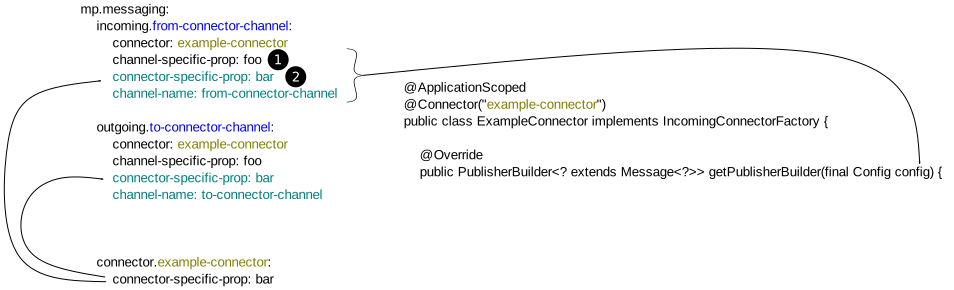
Connector specific config (1) merged together with global connector config (2).
Example connector accessing configuration:
Example consuming from connector:
@Incoming("from-connector-channel")
public void consume(String value) {
    System.out.println("Consuming: " + value);
}

// > Consuming: foo
// > Consuming: bar