
LRA
Overview
Distributed transactions for microservices are known as SAGA design patterns and are defined by the MicroProfile Long Running Actions specification. Unlike well known XA protocol, LRA is asynchronous and therefore much more scalable. Every LRA JAX-RS resource (participant) defines endpoints to be invoked when transaction needs to be completed or compensated.
Maven Coordinates
To enable Long Running Actions, add the following dependency to your project’s
pom.xml (see Managing Dependencies).
<dependencies>
  <dependency>
    <groupId>io.helidon.microprofile.lra</groupId>
    <artifactId>helidon-microprofile-lra</artifactId>
  </dependency>
  <!-- Support for Narayana coordinator -->
  <dependency>
    <groupId>io.helidon.lra</groupId>
    <artifactId>helidon-lra-coordinator-narayana-client</artifactId>
  </dependency>
</dependencies>
Usage
The LRA transactions need to be coordinated over REST API by the LRA
coordinator. Coordinator keeps track of all transactions and
calls the @Compensate or @Complete endpoints for all participants involved
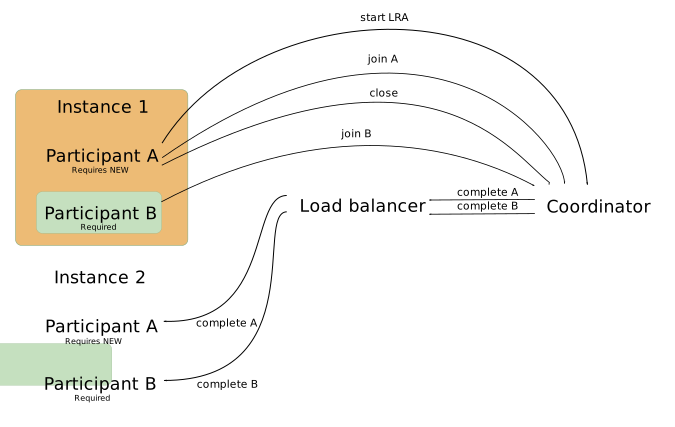
in the particular transaction. LRA transaction is first started, then joined by
participant. The participant reports the successful finish of
the transaction by calling it complete. The coordinator then calls the JAX-RS
complete endpoint that was registered during the join of each
participant. As the completed or compensated participants don’t
have to be on same instance, the whole architecture is highly scalable.
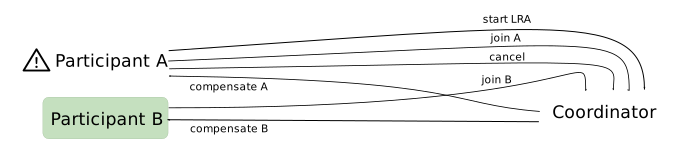
If an error occurs during the LRA transaction, the participant reports a cancellation of LRA to the coordinator. Coordinator calls compensate on all the joined participants.
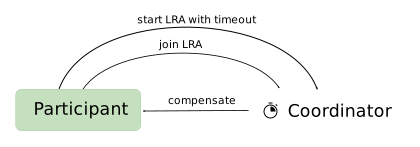
When a participant joins the LRA with timeout defined @LRA(value = LRA.Type.REQUIRES_NEW, timeLimit = 5, timeUnit = ChronoUnit.MINUTES), the
coordinator compensates if the timeout occurred before the close is reported by
the participants.
API
Participant
The Participant, or Compensator, is an LRA resource with at least one of the JAX-RS(or non-JAX-RS) methods annotated with @Compensate or @AfterLRA.
@LRA
See the Javadoc.
Marks JAX-RS method which should run in LRA context and needs to be accompanied by at least minimal set of mandatory participant methods(Compensate or AfterLRA).
LRA options:
- value
- REQUIRED join incoming LRA or create and join new
- REQUIRES_NEW create and join new LRA
- MANDATORY join incoming LRA or fail
- SUPPORTS join incoming LRA or continue outside LRA context
- NOT_SUPPORTED always continue outside LRA context
- NEVER Fail with 412 if executed in LRA context
- NESTED create and join new LRA nested in the incoming LRA context
- timeLimit max time limit before LRA gets cancelled automatically by coordinator
- timeUnit time unit if the timeLimit value
- end when false LRA is not closed after successful method execution
- cancelOn which HTTP response codes of the method causes LRA to cancel
- cancelOnFamily which family of HTTP response codes causes LRA to cancel
Method parameters:
- Header LRA_HTTP_CONTEXT_HEADER - ID of the LRA transaction
@PUT
@LRA(value = LRA.Type.REQUIRES_NEW,
     timeLimit = 500,
     timeUnit = ChronoUnit.MILLIS)
@Path("start-example")
public Response startLra(
        @HeaderParam(LRA_HTTP_CONTEXT_HEADER) URI lraId,
        String data) {
    return Response.ok().build();
}
@Compensate
See the Javadoc.
Compensate method is called by a coordinator when LRA is cancelled, usually by error during execution of method body of @LRA annotated method. If the method responds with 500 or 202, coordinator will eventually try the call again. If participant has @Status annotated method, coordinator retrieves the status to find out if retry should be done.
JAX-RS variant with supported LRA context values:
- Header LRA_HTTP_CONTEXT_HEADER - ID of the LRA transaction
- Header LRA_HTTP_PARENT_CONTEXT_HEADER - parent LRA ID in case of nested LRA
@PUT
@Path("/compensate")
@Compensate
public Response compensateWork(
        @HeaderParam(LRA_HTTP_CONTEXT_HEADER) URI lraId,
        @HeaderParam(LRA_HTTP_PARENT_CONTEXT_HEADER) URI parent) {
    return LRAResponse.compensated();
}
Non JAX-RS variant with supported LRA context values:
- URI with LRA ID
@Compensate
public void compensate(URI lraId) {
}
@Complete
See the Javadoc.
Complete method is called by coordinator when LRA is successfully closed. If the method responds with 500 or 202, coordinator will eventually try the call again. If participant has @Status annotated method, coordinator retrieves the status to find out if retry should be done.
JAX-RS variant with supported LRA context values:
- Header LRA_HTTP_CONTEXT_HEADER - ID of the LRA transaction
- Header LRA_HTTP_PARENT_CONTEXT_HEADER - parent LRA ID in case of nested LRA
@PUT
@Path("/complete")
@Complete
public Response complete(
        @HeaderParam(LRA_HTTP_CONTEXT_HEADER) URI lraId,
        @HeaderParam(LRA_HTTP_PARENT_CONTEXT_HEADER) URI parentLraId) {
    return LRAResponse.completed();
}
Non JAX-RS variant with supported LRA context values:
- URI with LRA ID
@Complete
public void complete(URI lraId) {
}
@Forget
See the Javadoc.
Complete and compensate methods can fail(500) or report that compensation/completion is in progress(202). In such case participant needs to be prepared to report its status over @Status annotated method to coordinator. When coordinator decides all the participants have finished, method annotated with @Forget is called.
JAX-RS variant with supported LRA context values:
- Header LRA_HTTP_CONTEXT_HEADER - ID of the LRA transaction
- Header LRA_HTTP_PARENT_CONTEXT_HEADER - parent LRA ID in case of nested LRA
@DELETE
@Path("/forget")
@Forget
public Response forget(
        @HeaderParam(LRA_HTTP_CONTEXT_HEADER) URI lraId,
        @HeaderParam(LRA_HTTP_PARENT_CONTEXT_HEADER) URI parent) {
    return Response.noContent().build();
}
Non JAX-RS variant with supported LRA context values:
- URI with LRA ID
@Forget
public void forget(URI lraId) {
}
@Leave
See the Javadoc.
Method annotated with @Leave called with LRA context(with header LRA_HTTP_CONTEXT_HEADER) informs coordinator that current participant is leaving the LRA. Method body is executed after leave signal is sent. As a result, participant methods complete and compensate won’t be called when the particular LRA ends.
Applications that use @Leave must configure mp.lra.participant.url so the
leave request identifies the same participant links that were registered when
the application joined the LRA.
- Header LRA_HTTP_CONTEXT_HEADER - ID of the LRA transaction
@PUT
@Path("/leave")
@Leave
public Response leaveLRA(
        @HeaderParam(LRA_HTTP_CONTEXT_HEADER) URI lraIdtoLeave) {
    return Response.ok().build();
}
@Status
See the Javadoc.
If the coordinator’s call to the participant’s method fails, then it will retry the call. If the participant is not idempotent, then it may need to report its state to coordinator by declaring method annotated with @Status for reporting if previous call did change participant status. Coordinator can call it and decide if compensate or complete retry is needed.
JAX-RS variant with supported LRA context values:
- Header LRA_HTTP_CONTEXT_HEADER - ID of the LRA transaction
- ParticipantStatus - Status of the participant reported to coordinator
@GET
@Path("/status")
@Status
public Response reportStatus(
        @HeaderParam(LRA_HTTP_CONTEXT_HEADER) URI lraId) {
    return Response.ok(ParticipantStatus.FailedToCompensate)
        .build();
}
Non JAX-RS variant with supported LRA context values:
- URI with LRA ID
- ParticipantStatus - Status of the participant reported to coordinator
@Status
public Response reportStatus(URI lraId) {
    return Response.ok(ParticipantStatus.FailedToCompensate)
        .build();
}
@AfterLRA
See the Javadoc.
Method annotated with @AfterLRA in the same class as the one with @LRA annotation gets invoked after particular LRA finishes.
JAX-RS variant with supported LRA context values:
- Header LRA_HTTP_ENDED_CONTEXT_HEADER - ID of the finished LRA transaction
- Header LRA_HTTP_PARENT_CONTEXT_HEADER - parent LRA ID in case of nested LRA
- LRAStatus - Final status of the LRA (Cancelled, Closed, FailedToCancel, FailedToClose)
@PUT
@Path("/finished")
@AfterLRA
public Response whenLRAFinishes(
        @HeaderParam(LRA_HTTP_ENDED_CONTEXT_HEADER) URI lraId,
        @HeaderParam(LRA_HTTP_PARENT_CONTEXT_HEADER) URI parentLraId,
        LRAStatus status) {
    return Response.ok().build();
}
Non JAX-RS variant with supported LRA context values:
- URI with finished LRA ID
- LRAStatus - Final status of the LRA (Cancelled, Closed, FailedToCancel, FailedToClose)
public void whenLRAFinishes(URI lraId, LRAStatus status) {
}
Configuration
Configuration options:
| Key | Type | Default value | Description |
|---|---|---|---|
mp.lra.coordinator.url | string | http://localhost:8070/lra-coordinator | Url of coordinator. |
mp.lra.coordinator.propagation.active | boolean | Propagate LRA headers LRA_HTTP_CONTEXT_HEADER and LRA_HTTP_PARENT_CONTEXT_HEADER through non-LRA endpoints. | |
mp.lra.participant.url | string | Canonical, externally reachable URL of the LRA-enabled service. This property is required when the application declares a non-JAX-RS participant callback or uses @Leave. The value must be an absolute HTTP or HTTPS URI with a host and may include a path and port, but not user info, query, or fragment. An explicit port 0 uses the bound default server listener port and is intended for direct-listener tests; configure the actual public port when callbacks pass through a proxy or load balancer. | |
mp.lra.coordinator.timeout | string | Timeout for synchronous communication with coordinator. | |
mp.lra.coordinator.timeout-unit | string | Timeout unit for synchronous communication with coordinator. | |
lra.participant.non-jax-rs.context-path | string | /lra-participant | Context path for non-JAX-RS participant callbacks. |
lra.participant.non-jax-rs.callback-auth.secret | string | Base64 URL-encoded callback-signing secret. This property is required when the application declares a non-JAX-RS participant callback. The decoded secret must contain at least 32 bytes. | |
lra.participant.non-jax-rs.callback-auth.compatibility-mode | boolean | false | Use unsigned callback URLs and accept unsigned callback requests. Enable this property only temporarily while upgrading from a version that does not sign callback URLs. |
Example of LRA configuration:
Non-JAX-RS Callback Authentication
Helidon authenticates non-JAX-RS participant callbacks with a capability
embedded in each callback URL. The capability is bound to the LRA identifier,
callback type, participant class, and participant method. Applications that
declare non-JAX-RS participant callbacks must configure a canonical callback
origin using mp.lra.participant.url and
lra.participant.non-jax-rs.callback-auth.secret with at least 32 bytes of
Base64 URL-encoded secret material.
Helidon does not derive non-JAX-RS callback URLs from the authority of an incoming request. Generate the secret with a cryptographically secure random number generator and use a separate secret for each application deployment. Share the secret only among replicas that serve the same callbacks. Store the secret in a protected configuration source rather than in application source control.
Callback URLs contain authentication material and must be handled as
credentials. Use TLS, or an equivalently protected trusted transport, for both
coordinator registration and participant callback traffic. Avoid recording
complete callback URLs in application, proxy, or access logs. Do not change the
signing secret until all LRAs registered with the existing secret have drained.
Changing it alters the registered callback URLs and can also prevent an
@Leave request from matching the participant registration.
mp.lra:
  participant.url: "https://participant.example/application"
lra.participant.non-jax-rs.callback-auth:
  secret: "<base64-url-encoded-secret>"
  compatibility-mode: false
Rolling Upgrade
The compatibility setting supports a rolling upgrade from a version that registered unsigned non-JAX-RS callback URLs. Compatibility mode deliberately preserves the previous behavior: upgraded nodes both generate and accept unsigned callback URLs. A request containing an invalid capability is rejected even in compatibility mode; only a request without a capability receives legacy handling.
If the previous deployment did not configure mp.lra.participant.url, or the
exact origin and path of existing participant links cannot be preserved, use a
drain-first upgrade:
- On the old version, quiesce requests that can start LRAs or register participants. Keep completion, compensation, callback, and leave traffic available.
- Wait until all existing participant registrations finish.
- Configure the canonical participant URL and signing secret, then upgrade the replicas.
When the exact origin and path already registered with the coordinator can be preserved, use this rolling procedure:
- Configure the same canonical
mp.lra.participant.urland signing secret, and setcompatibility-modetotruefor every replica. Preserve the participant origin and path already advertised to the coordinator; changing participant links prevents@Leavefrom matching an in-flight registration. The previous Helidon version ignores the callback-authentication settings. - Upgrade the replicas one at a time. Keep compatibility mode enabled on every upgraded replica.
- After all replicas run the new version, quiesce requests that can start LRAs or register participants. Keep completion, compensation, callback, and leave traffic available so existing LRAs can finish.
- Wait for every LRA registered before or during compatibility mode to finish and verify that no compatibility-era participant registrations remain.
- Set
compatibility-modetofalseand restart all replicas. Replicas may restart one at a time, but LRA creation and participant registration must remain quiesced until every replica uses strict mode. - Resume LRA traffic. New callback URLs are signed and unsigned callbacks are rejected.
For more information continue to MicroProfile Long Running Actions specification.
Examples
The following example shows how a simple LRA participant starts and joins a
transaction after calling the '/start-example' resource. When startExample
method finishes successfully, close is reported to coordinator
and /complete-example endpoint is called by coordinator to confirm successful
closure of the LRA.
If an exception occurs during startExample method execution, coordinator
receives cancel call and /compensate-example is called by coordinator to
compensate for cancelled LRA transaction.
Example of simple LRA participant:
Testing
Testing of JAX-RS resources with LRA can be challenging as LRA participant running in parallel with the test is needed.
Helidon provides test coordinator which can be started automatically with additional socket on a random port within your own Helidon application. You only need one extra test dependency to enable test coordinator in your @HelidonTest.
Dependency:
<dependency>
  <groupId>io.helidon.microprofile.lra</groupId>
  <artifactId>helidon-microprofile-lra-testing</artifactId>
  <scope>test</scope>
</dependency>
Considering that you have LRA enabled JAX-RS resource you want to test.
Example JAX-RS resource with LRA:
@ApplicationScoped
@Path("/test")
public class WithdrawResource {

    private final List<String> completedLras = new CopyOnWriteArrayList<>();
    private final List<String> cancelledLras = new CopyOnWriteArrayList<>();

    @PUT
    @Path("/withdraw")
    @LRA(LRA.Type.REQUIRES_NEW)
    public Response withdraw(
            @HeaderParam(LRA.LRA_HTTP_CONTEXT_HEADER) Optional<URI> lraId,
            String content) {
        if ("BOOM".equals(content)) {
            throw new IllegalArgumentException("BOOM");
        }
        return Response.ok().build();
    }

    @Complete
    public void complete(URI lraId) {
        completedLras.add(lraId.toString());
    }

    @Compensate
    public void rollback(URI lraId) {
        cancelledLras.add(lraId.toString());
    }

    public List<String> getCompletedLras() {
        return completedLras;
    }
}
Helidon test with enabled CDI discovery can look like this.
HelidonTest with LRA test support:
LRA testing feature has the following default configuration:
- port:
0- coordinator is started on random port(Helidon LRA participant is capable to discover test coordinator automatically) - bind-address:
localhost- bind address of the coordinator - helidon.lra.coordinator.persistence:
false- LRAs managed by test coordinator are not persisted - helidon.lra.participant.use-build-time-index:
false- Participant annotation inspection ignores Jandex index files created in build time, it helps to avoid issues with additional test resources - mp.lra.participant.url:
http://localhost:0- participant callbacks use the random default server listener port; override this setting with@AddConfigwhen callbacks use a proxy, load balancer, or another public origin
Testing LRA coordinator is started on additional named socket
test-lra-coordinator configured with default index 500. Default index can be
changed with system property helidon.lra.coordinator.test-socket.index.
Example: -Dhelidon.lra.coordinator.test-socket.index=20.
HelidonTest override LRA test feature default settings:
When CDI bean auto-discovery is not desired, LRA and Config CDI extensions needs to be added manually.
HelidonTest setup with disabled discovery:
@HelidonTest
@DisableDiscovery
@AddJaxRs
@AddBean(TestLraCoordinator.class)
@AddExtension(LraCdiExtension.class)
@AddExtension(ConfigCdiExtension.class)
@AddBean(WithdrawResource.class)
public class LraNoDiscoveryTest {
}
Coordinator
Coordinator is a service that tracks all LRA transactions and calls the
compensate REST endpoints of the participants when the LRA transaction gets
cancelled or completes (in case it gets closed). In addition, participant also
keeps track of timeouts, retries participant calls, and assigns LRA ids.
Helidon LRA supports following coordinators:
- MicroTx LRA coordinator
- Helidon LRA coordinator
- Narayana coordinator.
MicroTx Coordinator
Oracle Transaction Manager for Microservices - MicroTx is an enterprise grade transaction manager for microservices, among other it manages LRA transactions and is compatible with Narayana LRA clients.
MicroTx LRA coordinator is compatible with Narayana clients when
narayanaLraCompatibilityMode is on, you need to add another dependency to
enable Narayana client:
Dependency needed for using Helidon LRA with Narayana compatible coordinator:
<dependency>
  <groupId>io.helidon.lra</groupId>
  <artifactId>helidon-lra-coordinator-narayana-client</artifactId>
</dependency>
Run MicroTx in Docker:
docker container run --name otmm -v "$(pwd)":/app/config \
-w /app/config -p 8080:8080/tcp --env CONFIG_FILE=tcs.yaml \
--add-host host.docker.internal:host-gateway -d tmm:<version>
To use MicroTx with Helidon LRA participant, narayanaLraCompatibilityMode
needs to be enabled.
Configure MicroTx for development:
Helidon Coordinator
Build and run Helidon LRA coordinator:
docker build -t helidon/lra-coordinator https://github.com/helidon-io/helidon.git#:lra/coordinator/server
docker run --name lra-coordinator --network="host" helidon/lra-coordinator
Helidon LRA coordinator is compatible with Narayana clients, you need to add a dependency for Narayana client:
Dependency needed for using Helidon LRA with Narayana compatible coordinator:
<dependency>
  <groupId>io.helidon.lra</groupId>
  <artifactId>helidon-lra-coordinator-narayana-client</artifactId>
</dependency>
Narayana
Narayana is a transaction manager supporting LRA. To use Narayana LRA coordinator with Helidon LRA client you need to add a dependency for Narayana client:
Dependency needed for using Helidon LRA with Narayana coordinator:
<dependency>
  <groupId>io.helidon.lra</groupId>
  <artifactId>helidon-lra-coordinator-narayana-client</artifactId>
</dependency>
The simplest way to run Narayana LRA coordinator locally:
Downloading and running Narayana LRA coordinator:
curl https://repo1.maven.org/maven2/org/jboss/narayana/rts/lra-coordinator-quarkus/5.11.1.Final/lra-coordinator-quarkus-5.11.1.Final-runner.jar \
-o narayana-coordinator.jar
java -Dquarkus.http.port=8070 -jar narayana-coordinator.jar
Narayana LRA coordinator is running by default under lra-coordinator context,
with port 8070 defined in the snippet above you need to configure your Helidon
LRA app as follows:
mp.lra.coordinator.url=http://localhost:8070/lra-coordinator