

Config
Overview
Helidon provides a very flexible and comprehensive configuration system,
offering you many application configuration choices. The Config component
provides a Java API to load and process configuration data from various sources
into a Config object which the application can then use.
Maven Coordinates
To enable Config, add the following dependency to your project’s pom.xml (see
Managing Dependencies).
<dependency>
  <groupId>io.helidon.config</groupId>
  <artifactId>helidon-config</artifactId>
</dependency>
Usage
A brief overview of the config system helps clarify its different parts and how they work together. Most applications will typically deal with more than one of these parts.
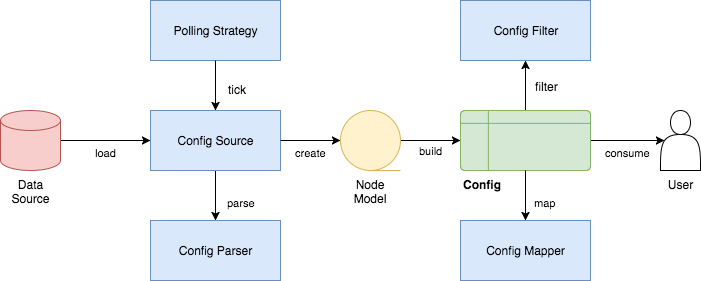
These are the main parts of the configuration system:
Configsystem - allows you to read configuration data in an application- A config source - a location containing configuration data (File, Map, Properties etc.)
- A config parser - a component capable of transforming bytes into configuration data (such as JSON content, YAML etc.)
Config Sources
Configuration can be loaded from different types of locations and expressed in different formats. The config system includes support for several types of config sources, for example:
- Environment variables - the property is a name/value pair.
- Java system properties - the property is a name/value pair.
- Resources in the classpath - the contents of the resource is parsed according to its inferred format.
- File - the contents of the file is parsed according to its inferred format.
- Directory - each non-directory file in the directory becomes a config entry: the file name is the key. and the contents of that file are used as the corresponding config String value.
- A URL resource - contents is parsed according to its inferred format.
- A variety of in-memory data structures (
String,Map,Properties)
See the Javadoc for the ConfigSources class for a complete
list of the built-in config source types and how to use them.
See the advanced topics' page for further information on some more involved aspects of config sources.
Config Parsers
When it reads configuration text from sources, the config system uses config parsers to translate that text into the in-memory data structures representing that configuration.
The config system includes several built-in parsers, such as for the Java
properties, YAML, JSON, and HOCON formats. See this section for
how to change your pom.xml to make parsers for those formats available to your
application. Then your application can invoke the config builder’s
addParser method so that builder will use the parsers you
choose.
You can extend the system with custom parsers of your own. Implement the
ConfigParser interface, then construct a Config.Builder
using the addParser method, passing an instance of your customer parser.
Invoke one of the sources methods to include a source that uses the custom
format and then build the Config object.
See the advanced topics' page for further information on some more involved aspects of config parsers.
Configuration
Global Configuration
Global configuration is a singleton instance of Config that is implicitly used
by some components of Helidon, plus it provides a convenient mechanism for your
application to retrieve configuration from anywhere in your code. By default,
global configuration is initialized to the default Config object (as returned
by Config.create()) and it is registered in the Helidon Service Registry.
To retrieve the global configuration, you fetch it directly from the service registry:
Config config = Services.get(Config.class);
Or you can use the global configuration convenience method to retrieve it:
Config config = Config.global();
If your application builds a custom configuration (from custom config sources
for example) and you would like this configuration to be discovered and used by
Helidon components then you should set this custom configuration instance as the
global configuration. You do this by setting the configuration instance directly
into the service registry (the old way of doing this via Config.global(config)
is deprecated).
Services.set(Config.class, config);
Note that if you want to explicitly set the global configuration then you must do it before any code in your application (or any Helidon component) retrieves global configuration. That means it should be done early in your application initialization before you create any other Helidon component.
Custom Config Sources
Although the default configuration is very simple to use, your application can
take full control of all configuration sources and precedence. You can do so by
creating and invoking methods on a Config.Builder object to construct a
Config instance.
When your application prepares a Config.Builder it sets what ConfigSources
and ConfigParsers the builder should use in constructing the resulting
Config object. The Javadoc explains how to use the
Config.Builder.
See the Custom Configuration Sources and advanced config sources sections for detailed examples and further information.
Accessing Config Values
You have used Helidon to customize configuration behavior from your code using
the Config and Config.Builder classes. As discussed previously, Config
system reads configuration from a config source, which uses a config parser to
translate the source into an in-memory tree which represents the configuration’s
structure and values.
This approach allows us to take any source data, be it a flat properties file or an object structure such as JSON, and transform it into a single tree that allows for overriding of values using heterogeneous config sources.
We are using the . as a separator of tree structure.
Example of two config sources that can be used by Config with the same data
tree in different formats:
A Properties source:
web.page-size=25
A YAML source:
web:
  page-size: 25
The configuration has the same internal representation in Config. Once
created, the Config object provides many methods the application can use to
retrieve config data as various Java types. See the Config Javadoc
for complete details.
int pageSize = config.get("web.page-size")
        .asInt()
        .orElse(20);
Or using the tree node approach:
int pageSize = config
        .get("web")
        .get("page-size")
        .asInt()
        .orElse(20);
For this first example we can see the basic features of Config:
- Configuration is a tree of
Confignodes - You can use
.as a tree separator when requesting node values - Each config value can be retrieved as a typed object, with shortcut methods
for the most commonly used types, such as
int,String,longand other - You can immediately provide a default value for the cases the configuration option is not defined in any source
Overriding Values
The Config system treats config sources as a hierarchy, where the first source
that has a specific configuration key "wins" and its value is used, other
sources are not even queried for it.
In order to properly configure your application using configuration sources, you need to understand the precedence rules that Helidon uses to merge your configuration data. If any of the Helidon required properties are not specified in one of these source, then Helidon will use a default value.
For example the default configuration when you use Config.create() uses the
following config sources in precedence order:
- System properties config source
- Environment variables config source
- A classpath config source called
application.?where the?depends on supported media types currently on the classpath. By default, it isproperties, but if you have YAML support on classpath, it would beapplication.yaml(aConfigParsermay add additional supported suffixes for default file)
Let’s consider the following keys:
- System property
answer=42 - Environment variable
ANSWER=38 - A key in a configuration file
answer=36
When you request config.get(`answer).asInt().orElse(25), you would get `42
This allows you to configure environment specific configuration values through system properties, environment variables, or through files available on each environment (be it a physical machine, a Kubernetes pod, or a docker image) without changing your source code.
Config Filters
Config system applies configured config filters on each value when it is requested for the first time.
There is a built-in filter called ValueResolvingFilter (enabled by default,
can be disabled through API) that resolves references to other keys in values in
configuration.
Example: Let’s consider the following example properties file
host=localhost
first-service.host=${host}/firstservice
second-service.host=${host}/secondservice
The filter resolves the ${host} reference to the localhost value.
This makes it easier to override values in testing and production, as you can
just override the host key and leave the URIs same.
See Filter, Overrides, and Token Substitution section for further information on some more involved aspects.
Typed config values
The Config object lets your application retrieve config data as a typed
ConfigValue.
You can retrieve a ConfigValue<T> using the following as methods in
Config:
asString()- to get a string config valueasBoolean()and other accessors for primitive typesas(Class)- to get a value for a type that has a mapper configuredas(Generic)- to get a value for a type supporting generics (such asSet<String>)asMap()- to get a map of key to value pairsasList(Class)- to get a list of typed valuesas(Function<Config,T>)- to get a typed value providing a mapper function
ConfigValue<T> can be used to obtain:
- an
Optional<T>value from a single node, - the
Tvalue from a single node interpreted as a basic Java type (primitive or simple object) already known to the config system (such as abooleanor aDouble), or - a complex Java type from a subtree of the config tree.
The config system automatically knows how to returnListandMapcomplex types, and you can provide config mappers to convert a config subtree to whatever Java types your application needs.
See Property Mapping page for details on how to use the built-in mappings and your own custom ones to convert to simple and complex types.
Dealing with Loading Errors: Retry Policies
Config sources, especially those that depend on fallible mechanisms such as the network or a shared file system, might fail to load during momentary outages. The config system allows you to build resiliency into your application’s use of configuration that relies on such technologies.
When your application builds a ConfigSource it can specify a retry policy.
When the config system needs to load data from that source it delegates the load
operation to that retry policy. That policy is responsible not only for loading
the data but also for detecting errors during loading and implementing the
algorithm for deciding when and how many times to retry a failed load before
reporting a failure back to your application.
The config system includes two predefined retry policies:
Predefined Retry Policies:
| Policy | Summary |
|---|---|
| "just call" (default) | asks the config source to load the data with no retry |
| "repeat" | performs a settable number of time-based retries, reporting failure only after all available retries have failed |
See the RetryPolicies Javadoc for complete details on these
built-in retry policies.
You can devise your own policy. Implement the RetryPolicy
interface. Then pass an instance of your policy implementation to the config
source builder’s retryPolicy method.
Change Support
Each Config object which the config system returns to your application is
immutable; even if the information in one of the underlying config sources
changes, an in-memory data structure built from the earlier content remains
unchanged.
Nevertheless, we know that configuration sometimes changes, and we may want to react to such changes. So the config system allows your application to learn when such underlying changes in the data occur and respond accordingly.
In Config system, you can do this through change support provided by these
components:
Config.onChange()API - you can use to add your listener, to be notified of configuration changesPollingStrategy- a component providing regular events to check if a source has changed. This requires support in config sources themselves (seePollableSource)ChangeWatcher- a component watching the underlying source for changes. This requires support in config sources themselves (seeWatchableSource)EventConfigSource- an event source that is capable of notifying about changes itself
If you want to receive onChange events, you must configure your Config with at
least one source that is capable of providing changes (having a
PollingStrategy or ChangeWatcher configured, or implementing
EventConfigSource)
The mutability documentation explains this in detail,
and the PollingStrategies Javadoc describes the built-in
implementations.
You can, of course, write your own by implementing the
PollingStrategy interface. On a config source builder
invoke pollingStrategy with an instance of your custom strategy and then
invoke build to create the ConfigSource.
Built-in Support for Config Formats
If you add additional Helidon config maven artifacts to your dependencies, then
the config system can read formats other than Java properties format and the
default configuration will search for other application file types in the
following order. Note that the default configuration stops once it finds one
of the files below; it does not merge all such files it can find.
Default Config Files (most to the least important)
| Source | Helidon maven artifact ID (group ID: io.helidon.config) | Notes |
|---|---|---|
application.yaml | helidon-config-yaml | YAML format |
application.conf | helidon-config-hocon | HOCON format |
application.json | helidon-config-hocon | JSON format |
application.properties | helidon-config | Java properties format |
You can also extend the config system to handle other types of sources by
implementing the ConfigSource interface. See the
extensions' documentation for complete information.
Reference
| Name | Description |
|---|---|
| SE Config Guide | Step-by-step guide about using Config in your Helidon SE application. |
Additional Information
The links in the following tables lead you to more information about various other config topics.
Controlling How Config is Loaded:
| Topic | Documentation |
|---|---|
| Where config comes from | Config sources,Config Profiles |
| What format config data is expressed in | Config parsers, supported formats |
| How to filter, override, and dereference values | Filters and overrides |
| What happens when config data changes | Mutability Support |
| How to deal with loading errors | Config retry policies |
Accessing Configuration Data:
| Topic | Documentation |
|---|---|
| How config data is translated into Java types | Config mappers |
| How to navigate config trees | Navigation |
Extending and Fine-tuning the Config System:
| Topic | Documentation |
|---|---|
| Writing extensions | Extensions |