
Hierarchical Features
Overview
The config system represents configuration as a tree in memory. Many developers will choose to work directly with config values — values from the leaves in the tree — accessing them by their keys. You can also navigate explicitly among the nodes of the tree without using keys. This section describes what the tree looks like and how you can traverse it.
Configuration Node Types
The config system represents configuration in memory using three types of nodes,
each a different interface defined within the ConfigNode
interface.
ConfigNode Types:
| Type | Java Interface | Usage |
|---|---|---|
| object | ConfigNode.ObjectNode | Represents complex structure (a subtree). Its child nodes can be of any type. |
| list | ConfigNode.ListNode | Represents a list of nodes. Its components can be of any type. |
| value | ConfigNode.ValueNode | Represents a leaf node. |
A node of any type can have a String value.
Each config tree in memory will have an object node as its root with child nodes as dictated by the source config data from which the config system built the tree.
config.get("key.does.not.exist")
Config node object with type MISSING. The
in-memory config tree contains nodes only of types OBJECT, LIST, and
VALUE.Configuration Key
Each config node (except the root) has a non-null key. Here is the formal definition of what keys can be:
The ABNF syntax of config key:
config-key = *1( key-token *( "." key-token ) )
key-token = *( unescaped / escaped )
unescaped = %x00-2D / %x2F-7D / %x7F-10FFFF
       ; %x2E ('.') and %x7E ('~') are excluded from 'unescaped'
escaped = "~" ( "0" / "1" )
       ; representing '~' and '.', respectively
In-memory Representation of Configuration
The following example is in HOCON (human-optimized config object notation) format. The config system supports HOCON as an extension module.
HOCON application.conf file:
app {
    greeting = "Hello"
    page-size = 20
    basic-range = [ -20, 20 ]
}
data {
    providers: [
        {
            name = "Provider1"
            class = "this.is.my.Provider1"
        },
        {
            name = "Provider2"
            class = "this.is.my.Provider2"
        }
    ]
}
The diagram below illustrates the in-memory tree for that configuration.
Config Nodes structure of application.conf file
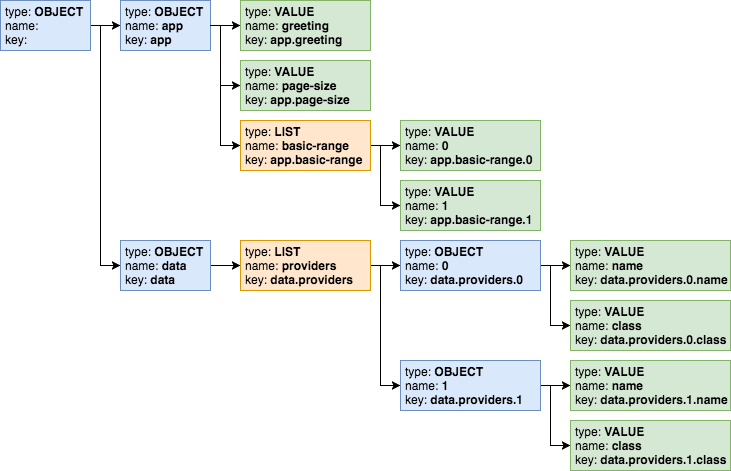
- Each non-root node has a name which distinguishes it from other nodes with
the same parent. The interpretation of the name depends on the node type.
Node Type Name object
member name of the node within its parent value list element index of the node within the containing list - Each node’s key is the fully-qualified path using dotted names from the root to that node.
- The root has an empty key, empty name, and no value.
The Config object exposes methods to return the name, key,
and type of the node.
Access by Key
For many applications, accessing configuration values by key will be the simplest approach. If you write the code with a specific configuration structure in mind, your code can retrieve the value from a specific configuration node very easily.
Your application can specify the entire navigation path as the key to a single
get invocation, using dotted notation to separate the names of the nodes along
the path. The code can navigate one level at a time using chained get
invocations, each specifying one level of the path to the expected node. Or, you
can mix the two styles.
All the following lines retrieve the same Config node.
Equivalent Config Retrievals:
The Config.get(key) method always returns a Config object without throwing
an exception. If the specified key does not exist the method returns a Config
node of type MISSING. There are several ways your application can tell whether
a given config value exists.
| Method | Usage |
|---|---|
exists | Returns true or false |
ifExists | Execute functional operations for present nodes |
type | Returns enum value for the Config.Type; Config.Type.MISSING if the node represents a config value that does not exist |
as | Returns the ConfigValue with the correct type that has all methods of Optional and a few additional ones - see ConfigValue interface. |
The config system throws a MissingValueException if the application tries to
access the value of a missing node by invoking the ConfigValue.get() method.
Access by General Navigation
Some applications might need to work with configuration without knowing its
structure or key names ahead of time, and such applications can use various
methods on the Config class to do this.
General Config Node Methods:
| Method | Usage |
|---|---|
asNodeList() | Returns a ConfigValue<List<Config>>. For nodes of type OBJECT contains child nodes as a List |
hasValue() | For any node reports if the node has a value. This can be true for any node type except MISSING |
isLeaf() | Reports whether the node has no child nodes. Leaf nodes have no children and has a single value |
key() | Returns the fully-qualified path of the node using dotted notation |
name() | Returns the name of the node (the last part of the key) |
asNode() | Returns a |
traverse() | Returns a Stream<Config> as an iterative deepening depth-first traversal of the subtree |
traverse(Predicate<Config>) | |
type() | Returns the |
List names of child nodes of an object node:
List child nodes of a list node:
The traverse() method returns a stream of the nodes in the subtree that is
rooted at the current configuration node. Depending on the structure of the
loaded configuration the stream contains a mix of object, list or leaf value
nodes.
Traverse subtree below a list node:
OBJECT   data.providers.0
VALUE   data.providers.0.name
VALUE   data.providers.0.class
OBJECT  data.providers.1
VALUE   data.providers.1.name
VALUE   data.providers.1.class
The optional Predicate<Config> argument to the traverse methods allows the
application to prune the traversal of a subtree at any point.
Traverse root (object) node, skipping the entire data subtree:
OBJECT    app
VALUE   app.page-size
VALUE   app.greeting
LIST    app.basic-range
VALUE   app.basic-range.0
VALUE   app.basic-range.1
Detaching a Config Subtree
Sometimes it can be convenient to write part of your application to deal with configuration without it knowing if or where the relevant configuration is plugged into a larger config tree.
For example, the application.properties from the
introduction section contains several settings prefixed with web such as
web.page-size. Perhaps in another config source the same information might be
stored as server.web.page-size:
Alternate Structure for Web Config:
server.web.page-size: 40
server.web.debug = true
server.web.ratio = 1.4
You might want to write the web portion of your app to work with a config subtree with keys that are independent of the subtree’s position in a larger tree. This would allow you to reuse the web portion of your application without change, regardless of which structure a config source used.
One easy way to do this is to detach a subtree from a larger config tree. When
your application invokes the Config.detach method it gets
back a copy of the config node but with no parent. The copy and the original
node both point to the same objects for their child nodes (if any). The original
node is unchanged.
Detaching a Subtree: